
I am developing my apps independently and AI-supported, using SL.works as a provisional brand name.
- Currency
Converter - Connected
Chess - Kanban
Flow - Image
Viewer - Branch
Out - Nano
Tone

SLCurrencyConverter
AppStore-Link: https://apps.apple.com/de/app/slcurrencyconverter/id6816727505?l=en-GB
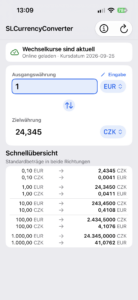
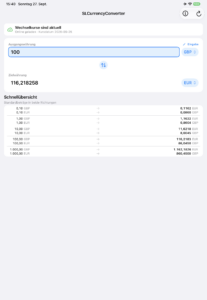
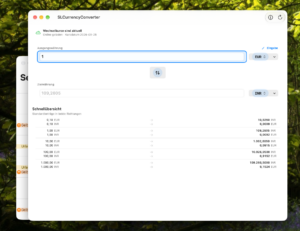
SLCurrencyConverter is a fast, simple currency converter for everyday use. Instantly convert between a wide range of currencies using current exchange rates, refresh rates whenever you need them, and keep working offline with previously saved rates.
Clear input fields, quick currency selection, and practical reference amounts make comparisons easy—whether you are travelling, shopping internationally, or planning expenses. No account, no ads, and no tracking.
The app is originally designed for iPhone and iOS V27 but also runs on MacOS 27.
Data privacy statement:
SLCurrency Converter – Data Privacy Statement / Datenschutzerklärung
Terms of Use / Nutzungsbedingungen:
SLCurrencyConverter – Terms of use / Nutzungsbed

SLConnectedChess
SLConnectedChess is a sleek, local-first chess app for iOS / MacOS that brings the timeless game of chess to life with a modern look, smooth gameplay, and effortless ways to play with others — or on your own.
Whether you have a friend right next to you, across the room on the same Wi-Fi, or just want to sharpen your skills, SLConnectedChess lets you choose how you want to play:
• Play Against the Computer – Take on a simple, built-in computer opponent whenever you feel like a quick match.
• Pass & Play – Share a single device and take turns for a classic, couch-friendly game.
• Local Network Multiplayer – Use peer-to-peer device discovery to instantly connect and play real-time chess with nearby friends over your local Wi-Fi network.
Make It Your Own
Add a bit of personality to every match with a range of included piece outfits. From clean, modern designs to bold, etched styles, you can easily switch up the look of your pieces to suit your taste. Combined with multiple board themes, SLConnectedChess feels as polished as it is playful.
Authentic Chess, No Fuss
SLConnectedChess enforces the full rule set of standard chess, including castling, en passant, pawn promotion, check, checkmate, stalemate, and draw agreements. It’s a true-to-form chess experience wrapped in a beautiful, touch-friendly interface.
Private, Fast & Frictionless
No accounts. No ads. No internet required for local play. Just launch the app, pick your mode, and get straight into the game.
Data privacy statement:
SLConnectedChess – Data Privacy Statement / Datenschutzerklärung
Terms of Use / Nutzungsbedingungen:
SLConnectedChess – Terms of use / Nutzungsbedingungen

SL.KanbanFlow
SLKanbanFlow brings clarity to complex work. Organise tasks on flexible Kanban boards, assign responsibilities, define priorities and statuses, use labels and workstreams, and track progress through focused dashboard and board views.
Unlike many conventional Kanban tools, SLKanbanFlow combines visual workflow management with hierarchical task structures and a dedicated object tree. This makes it suitable not only for flat task lists, but also for projects with dependencies, sub-tasks and structured organisational information. It’s also capable of dealing with multiple workstreams in parallel.
Designed for Apple platforms, SLKanbanFlow supports iCloud synchronisation, local-first data handling, multilingual use and configurable company branding. Add your own logo and company title, customise master data and workflows, and adapt the app to the way your organisation actually works.
Data privacy statement:
SLKanbanFlow – Data Privacy Statement / Datenschutzerklärung
Terms of Use / Nutzunghsbedingungen:
SLKanbanFlow– Terms of use / Nutzungsbedingungen

SL.Imageviewer
SLImageViewer is a lightweight image viewer for macOS and iPad that focuses on the essentials: fast viewing, easy editing, and straightforward exporting – even for large photo collections from local folders or transparently loaded cloud folders.
• Viewing & navigation: Open image folders with a click, flip through photos with the arrow keys or the space bar, run slideshows, go fullscreen, and use a tidy filmstrip with all previews at a glance.
• Fast previews, even for cloud files: Thumbnails are cached in the background and loaded with a progress indicator – no blank slots, even when files still need to be downloaded. You can inspect, delete, or reveal the cache in Finder at any time.
• Zoom & tools: A pixel-perfect 100% view, a loupe/magnifier, and handy gestures for precise work.
• Quick editing: Brightness, contrast, white balance (warmer/cooler), auto-enhance, grayscale, invert, rotate, and flip – all with live preview and undo/redo.
• App Store export: Crop directly to all common screenshot sizes (iPhone, iPad, Mac) using the App Store crop overlay, and export as PNG or JPG.
Data privacy statement:
SLImageViewer – Data Privacy Statement / Datenschutzerklärung
Terms of Use / Nutzungsbedingungen:
SLImageViewer– Terms of use / Nutzungsbedingungen

SL.BranchOut
SLBranchOut — Think in every direction. A classical Mindmapping-solution.
SLBranchOut is a native mind mapping app for Mac, iPhone, and iPad that turns scattered thoughts into clear structure. Sketch ideas on an infinite canvas with organic, hand-drawn branches, then switch seamlessly between mind map, tree, and org chart layouts — your content, three perspectives.
• Three layouts, one document — Mindmap, Tree, or Organization chart at the flip of a switch
• Organic canvas — smooth pan, pinch, and scroll-wheel zoom with paper-style rendering
• Rich branches — five color themes, images, and person cards for teams and org charts
• Export anywhere — PNG, PDF, plain text, FreeMind (.mm), and MindManager (.xmmap)
• One app, every device — native SwiftUI for macOS, iPhone, and iPad (iOS 26.6+), with identical features on all platforms
• International — available in German and English
From brainstorming sessions to project structures: SLBranchOut keeps your ideas branching out — and everything under control.
SLBranchOut. Branch out your thinking.
Data privacy statement:
SLBranchOut – Data Privacy Statement / Datenschutzerklärung
Terms of Use / Nutzunghsbedingungen:
SLBranchOut– Terms of use / Nutzungsbedingungen

SL.NanoTone (under construction)
SL.NanoTone is a compact, privacy-friendly music player for iPhone and Mac, designed for playing and managing your own local music collection. It supports popular audio formats including MP3, M4A, AAC, FLAC, WAV, and OGG, with flexible playlists, background playback, and AirPlay support.
The app features an integrated equalizer, experimental audio effects, multiple audio-reactive visualizers, and a convenient Mini Player (on MacOS only). You can edit metadata such as titles, artists, albums, genres, and track numbers, as well as add and embed cover artwork from files, URLs, or web searches.
SL.NanoTone also supports synchronized LRC lyrics, optional online lyrics search through LRCLIB, and automatic highlighting of the current line. Local tracks from the Apple Music library can be accessed on Mac. With adaptable layouts, light and dark appearances, and interfaces in English and German, SL.NanoTone delivers a focused listening experience without user accounts, proprietary cloud services, advertising, or integrated tracking.
Data privacy statement:
SLNanoTone – Data Privacy Statement / Datenschutzerklärung
Terms of Use / Nutzungsbedingungen:
SLNanoTone – Terms of use / Nutzungsbedingungen